
If you're over 50 and wondering whether it's too late to build income online, you're not alone. You may have finally started an email list, opened an email platform, and immediately felt behind because every button seemed to lead somewhere unfamiliar. You might even wonder whether anyone will read your messages, or whether one mistake will make subscribers leave.
You're not behind. An onboarding email sequence is the first few emails a new subscriber receives after joining your list. These messages can welcome her, explain what happens next, offer one useful resource, and begin a real relationship without requiring advanced technical skills.
Starting Where You Are
Perhaps you've spent the morning creating a free guide, setting up a signup form, and connecting it to an email tool. You feel proud for getting that far. Then the platform asks you to create an automation, choose a trigger, write preview text, set a delay, and add a button.
That's the moment many new creators close the laptop.
You're not failing because the technology feels unfamiliar. You're learning several new ideas at once. A midlife woman starting an online business, Affiliate Marketing project, or newsletter often brings valuable life experience but little patience for confusing dashboards. She doesn't need another promise that everything is effortless. She needs a calm explanation and one manageable action at a time.
A reassuring way to think about it: your first sequence is a welcome mat, not a complicated machine.
An onboarding email sequence gives your new subscriber a gentle path. The first message might say, “Thank you for joining.” The next might deliver the checklist or training she requested. Another could answer a common question and invite her to take one small step.
That approach matters for anyone learning affiliate marketing for beginners over 50. If you recommend a product, course, or tool, subscribers need context before they're ready to consider it. Trust grows when your emails help them understand what they signed up for instead of immediately pushing an offer.
Your email list also gives you something you control. Social platforms can change their features, visibility, or rules. An owned list lets you communicate directly with people who chose to hear from you. This guide to building an email list offers useful background if you're still deciding why that asset matters.
Start with a simple promise:
- You'll know what to expect.
- You'll receive useful guidance.
- You'll never need to guess what to do next.
That's enough for your first version. You can improve it after you've watched how real subscribers respond.
What an Onboarding Sequence Is For
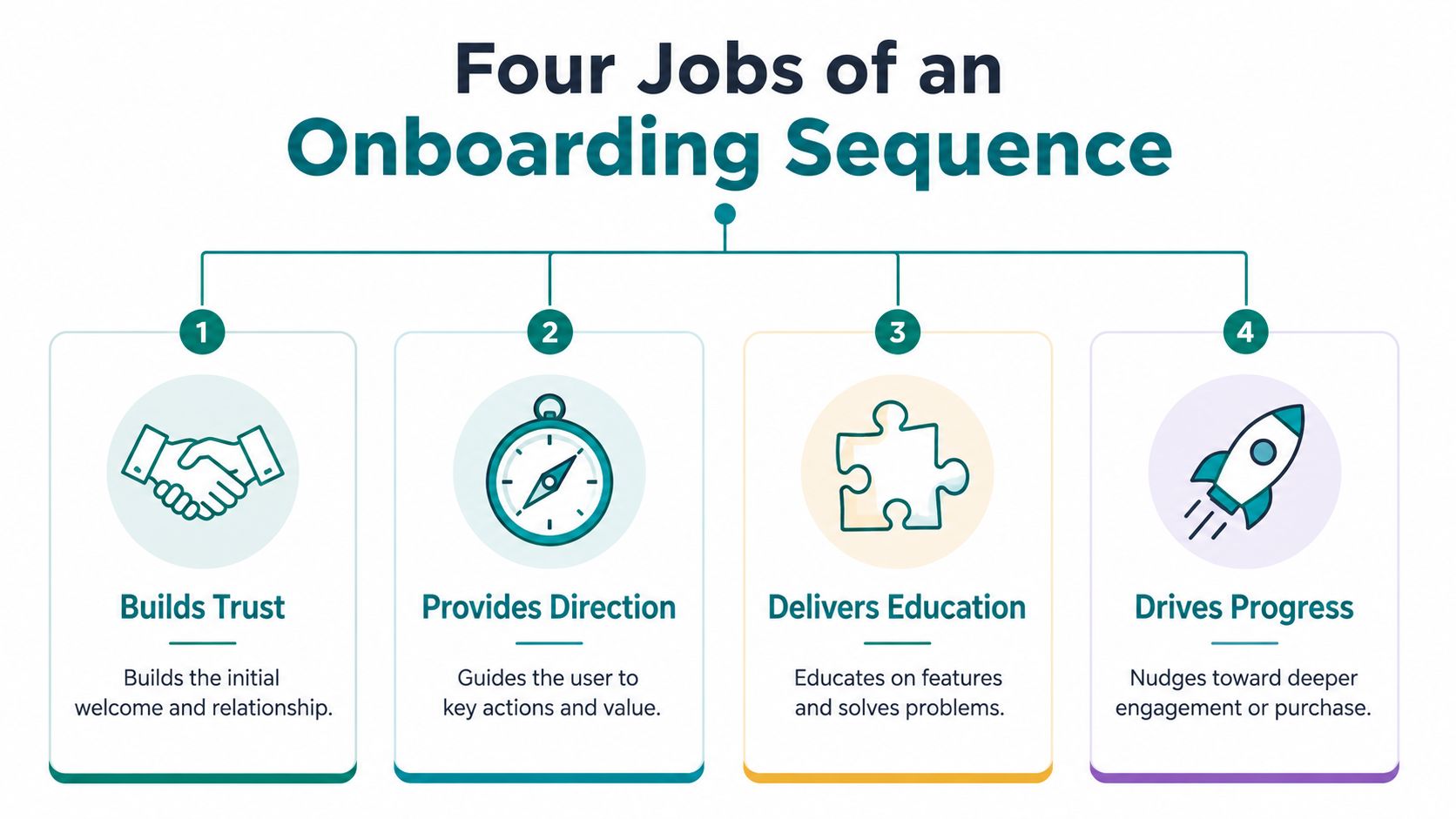
A new subscriber may arrive curious but uncertain, especially if she is a midlife woman or a new creator who feels behind on technology. An onboarding sequence gives that relationship a steady beginning. Each email has one primary purpose, one clear next action, and a tone that feels like a thoughtful note from a real person.
It sets expectations
Your first email should confirm why she is hearing from you. Tell her what she requested, what she will receive, and how often you generally plan to email.
For example, a new subscriber downloads a guide about starting an online business. Your welcome message can confirm the download, explain that a short series will follow, and tell her that the next email will focus on choosing a simple starting point.
Clear expectations reduce confusion. They also make your messages feel like a planned conversation rather than unrelated notes arriving in her inbox.
It begins trust
Trust grows when your message sounds human, useful, and respectful of the reader's time. It does not require you to present yourself as someone who has every answer.
Share a small piece of your own experience. You might write, “The first time I opened an email dashboard, I nearly quit because I didn't understand the automation screen.” That sentence can reassure someone who feels exactly the same way, while showing that learning the technology can happen gradually.
It guides one first action
A subscriber should know what to do after reading. She might download a resource, watch a short lesson, reply with a question, or complete the first step in a product.
Keep the choice narrow. A message filled with links to articles, platforms, and offers can leave a beginner unsure where to begin. One manageable action gives her a clear path and helps you see whether the message was useful.
It notices interest
An email platform can often record whether someone clicked a particular link. That action gives you a practical clue about what she wants to learn next.
Someone who clicks a training link may need a deeper educational message. Someone who joined through a Retirement-planning article may respond better to practical income content than to a general creator update. A detailed walkthrough can help you build an onboarding email sequence, while the relationship remains the larger purpose.
The sequence becomes a relationship thread. One message welcomes, another helps, another answers a question, and a later message introduces a relevant offer. Every email has one job, but the sequence gives those jobs meaning together.
A Simple Sequence You Can Model
You don't need to write a complicated campaign before you begin. A practical sequence often contains three to five emails across the first one to two weeks, with each message assigned a single task. That structure is supported by onboarding guidance from Lettr's email best-practice resource and eMercury's welcome journey guidance.
Here's a five-email model you can adapt.
Email one, immediate welcome
Send this message as soon as the subscriber confirms her signup. Thank her, deliver what you promised, and explain what comes next.
A subject line can be short and personal, such as:
- Welcome, let's get started
- Your guide is ready
- A simple first step
The body doesn't need a long introduction. Tell her where to click and what she'll find there. Use one CTA, such as “Open your guide.”
This email should answer five basic questions quickly: what she signed up for, what she should do next, how long the step may take, where to click, and what happens afterward. That clarity is a central principle in this onboarding sequence guide.
Email two, useful instruction
Send this after the subscriber has had time to open the first message. Deliver a short lesson related to the resource she requested.
If your audience is interested in making money online after 50, you might explain how an email list supports a simple online business. Don't try to teach the entire business model. Give her one idea she can understand and use.
The CTA could be “Read the next lesson.” Keep the subject specific and avoid packing several promises into one line.
Email three, a human story
Use this message to share a small personal experience or a beginner-friendly quick win. Perhaps you once struggled to choose an affiliate niche, or you felt uncertain about writing your first email.
The story doesn't need dramatic results. A modest, honest moment often feels more believable. End with one action, such as “See the worksheet.”
Email four, a check-in
Ask how the subscriber is doing and offer a clear next step. You might invite her to watch a training, join a community, or reply with the question she's facing.
A check-in should feel like support, not surveillance. If she hasn't clicked anything, don't assume she's uninterested. She may have been busy, confused, or reading on a phone.
Email five, a relevant offer
Only after you've welcomed and helped the subscriber should you introduce your primary offer. Explain who it's for, what problem it addresses, and what the next step involves.
Your CTA might say “See the training details.” Avoid forcing a decision. A calm invitation protects the relationship, especially when your audience is cautious about online business claims.
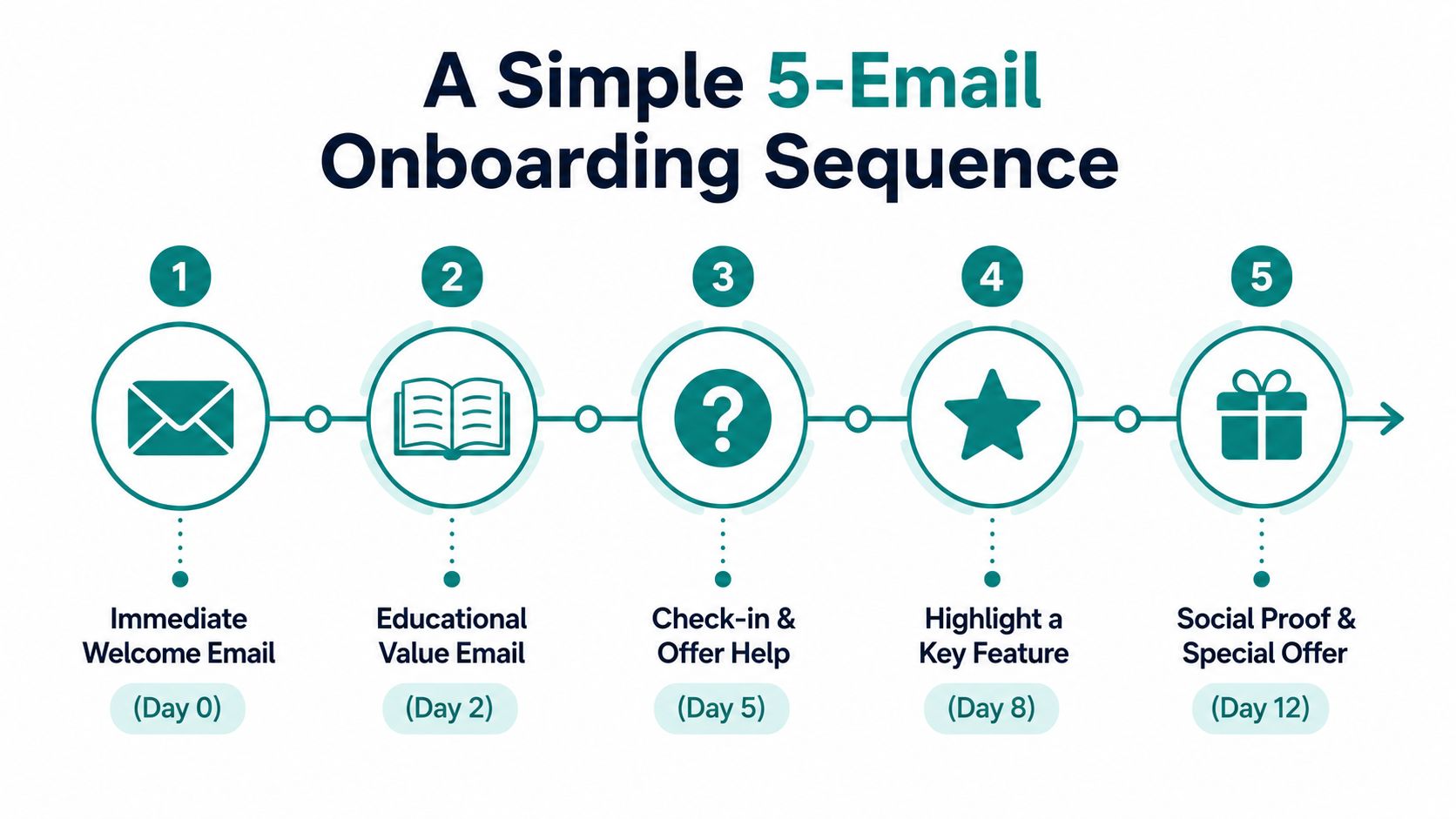
The exact pace should reflect how quickly your subscriber can reach value. Recent onboarding guidance also describes five to eight emails across ten to twenty-one days, while emphasizing that behavior and time-to-value should shape the timing, not a rigid calendar alone (Digital Applied's 2026 CRM playbook).
Setting Up the Sequence Step by Step
Open your email platform and look for a feature named automation, workflow, customer journey, or autoresponder. The name varies, but the basic logic remains similar: a person takes an action, and the platform sends a prepared message.
Choose the sender first
Use a sender name that sounds like a person. “Victoria from [Brand Name]” feels warmer than a name that looks like a machine-generated department.
Choose a real inbox that can receive replies. Even if you don't answer immediately, subscribers should have a genuine way to contact you.
Next, select the signup form or list that should activate the sequence. A confirmed signup trigger is usually the cleanest starting point because the subscriber has completed the permission step.
Build the welcome message
Create the first email and fill in the basic fields:
- Subject line: Keep it short, personal, and specific.
- Preview text: Extend the subject with a useful detail.
- Opening line: Thank the subscriber and confirm what she requested.
- Main body: Explain one next action in plain language.
- Button or link: Use a single primary CTA.
A simple body might read:
Thank you for joining. Your beginner's guide is ready below. Start with the first page, and watch for another short email with one practical idea to help you continue.
Then add the link to the guide.
Add timing and safeguards
Set the first email to send immediately. Schedule later messages with delays that match the sequence you created, rather than sending everything at once. Guidance from Mail Merge for Gmail's onboarding resource can help if you want to compare different ways to arrange the messages.
Write a confirmation email as well. It should tell subscribers that their signup worked and explain what they'll receive. This small message prevents the uncomfortable experience of wondering whether the form submitted correctly.
Before you publish, review the settings:
- Trigger: The correct form or list activates the workflow.
- Sender: The name and reply address look human.
- Sequence: Every email has a subject, body, and one CTA.
- Timing: The first message sends immediately, later messages follow your intended spacing.
- Exit rule: A subscriber who completes the main goal doesn't keep receiving an irrelevant offer.
If you're comparing platforms, this guide to email marketing platforms for small business can help you focus on beginner-friendly features. Resources about high-converting email campaigns can also provide ideas for organizing subject lines, messages, and calls to action.
Personalization and Behavior Triggers
Personalization doesn't require writing a completely different email for every person. It begins with remembering how someone entered your world and responding to what she does next.
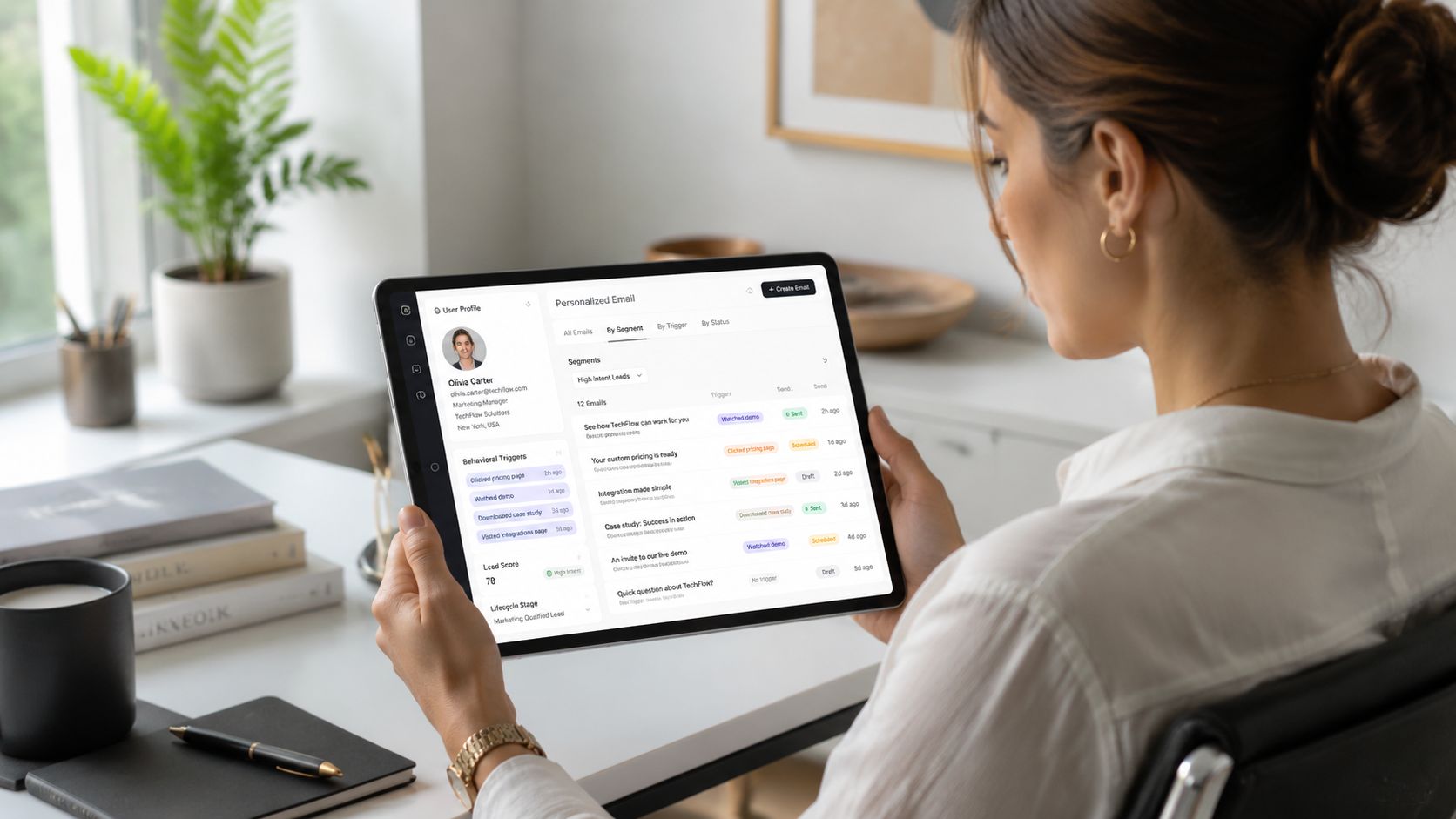
A tag is a small label attached to a subscriber. For example, you might tag someone as “webinar,” “affiliate basics,” or “retirement transition,” depending on the signup source. A segment is a group of subscribers who share a tag or behavior.
The more useful distinction is between a calendar trigger and a behavior trigger. A calendar trigger sends an email because a certain amount of time has passed. A behavior trigger sends it because the subscriber clicked, downloaded, replied, or completed an action.
Start with the easiest label
Tag subscribers by signup source. Someone who joins through a guide about online business for older women may need different examples from someone who joins through an Affiliate Marketing tutorial.
You don't need dozens of categories. Begin with the sources you already use, then add a label when it will change the message you send.
Let clicks guide the next message
Suppose you send a training link. Subscribers who click can receive a follow-up that assumes they've seen the lesson. Subscribers who don't click can receive a gentler reminder that explains what they'll gain from opening it.
That small branch makes the experience feel more considerate. You're not sending the same message repeatedly to everyone, and you're not treating silence as rejection.
A useful boundary: personalize to be more helpful, not more intrusive.
You can also suppress people who have already completed the action. If someone downloaded the guide, don't keep inviting her to download it. If she purchased a training, move her toward support and implementation instead of continuing to sell the same starting point.
Behavior-based onboarding is widely recommended because user actions often reveal more than a fixed schedule. One practical guide recommends segmenting by acquisition source, using one action in the welcome email, and measuring whether subscribers reach an activation milestone within thirty days (Worksbuddy's onboarding best practices). You can begin with only one branch. A simple system that respects attention is better than an elaborate system you can't maintain.
Testing, Reading the Numbers, and Improving
Once your sequence is live, you don't need to become an analytics specialist. Watch a few signals and use them to ask better questions.
Open rate can show whether the sender name and subject line attract attention. Click-through rate can show whether the email body and CTA make the next action clear. Unsubscribe rate can suggest that expectations, relevance, or pacing need adjustment.
Onboarding benchmarks vary by business and audience. Benchmark summaries commonly place customer onboarding open rates around 40% to 60%, click-through rates around 10% to 25%, and activation milestone completion around 20% to 45% (customer onboarding benchmarks). Welcome-email benchmark sets have also reported open rates from 68.6% to 84.22% and click-through rates from 14.34% to 25.91% (GetResponse benchmark coverage). Treat these as directional context, not a verdict on your worth or ability.
Use a calm testing habit
Before sending, preview each email on your phone. Send a test to yourself, click every link, and check whether the message appears in spam. Confirm that the promised guide opens and that the button works.
For a first A/B test, change one subject line and leave the rest alone. Run the comparison for a consistent period, then keep the version that produces the clearer result. Guidance about interpreting email click-through rate benchmarks can help you understand what the click signal means.
Check your email deliverability and inbox placement before changing your entire sequence. Sometimes a message needs better writing. Sometimes it needs a clearer link. Sometimes it isn't reaching the inbox.
Think weekly, not constantly. A short review gives you room to notice patterns without turning your online business into another source of pressure.
Your list is an owned asset. It can support your work while you're offline, but it still needs care, relevance, and permission. If you're wondering is Affiliate Marketing legit, a thoughtful onboarding sequence won't prove every online offer is trustworthy. It will help you demonstrate your own standards through consistent, useful communication.
Victoria OHare offers beginner-friendly guidance on List Building, Affiliate Marketing, and simple automation for midlife women and new creators. Visit Victoria OHare to learn how to create an email system that builds trust gradually and supports a more independent second chapter.