
If you've spent years building a career, a home, or a family, and now you're wondering whether it's too late to create something that gives you more peace of mind, you're not alone. A lot of people feel behind when they start looking at online income, tech tools, or email marketing for the first time. That uneasiness is real, especially when you're trying to protect your future and every dashboard seems to speak a language you didn't grow up with.
The good news is that you're not starting from zero. You can learn what matters, one clear step at a time, and you don't need a technical background to understand how your emails are getting lost.
Why Your Emails Are Quietly Disappearing
The first sign of a deliverability problem usually isn't a dramatic error message. It's silence. You send a newsletter, a welcome sequence, or a product update, then open your email platform and see that very few people interacted with it.
That moment can feel personal. You start wondering if the subject line was weak, if the offer missed the mark, or if you somehow “broke” email. Most of the time, the issue is quieter than that. The message may have been accepted by the mail server, but it never made it to the inbox where people could see it.

Delivery is not the same as inbox placement
Email delivery means the receiving server accepted the message. Email deliverability means the message reached the inbox, where a reader had a fair chance to see it and act on it. That difference matters because a delivered email can still land in spam, promotions, or nowhere useful at all.
The scale of that problem is easy to underestimate. A widely cited benchmark puts global inbox placement at about 83.1%, which means roughly 1 in 6 marketing emails never reaches the inbox and about 16.9% fail to arrive where intended, according to the deliverability benchmark summary from Landbase. More recent benchmark summaries report a similar 83.5% global inbox placement range, with about 6.7% landing in spam and 9.8% going missing entirely, also cited in the same benchmark overview.
That's why deliverability isn't a tiny technical detail. It changes whether your work can be seen.
Practical rule: if people never see the email, the best subject line in the world can't help it.
The main signals mailbox providers watch
Mailbox providers are trying to protect their users from junk. They look at more than whether a message was technically accepted. In plain language, they pay attention to whether people open, click, reply, complain, or ignore your messages over time.
A 2025 Mailgun survey of 1,100 senders found that the top deliverability metrics people track are open and click rates (57.4%), delivery rate (53.1%), bounce rates (46.5%), unsubscribe rate (39.5%), and spam complaints (32%) (Mailgun survey PDF). That tells you something important. Deliverability is no longer just about getting mail accepted at the door. It's about whether your audience behaves like they want it.
If you want a plain-English explanation of the concept before you dive deeper, the email deliverability full guide from Mailadept is a useful place to start. It helps anchor the vocabulary before you touch any settings.
For beginners, the key idea is simple. Think of your list like an asset. You're not trying to blast more messages into the world. You're trying to protect access to the people who already chose to hear from you.
Authenticating Your Sending Domain
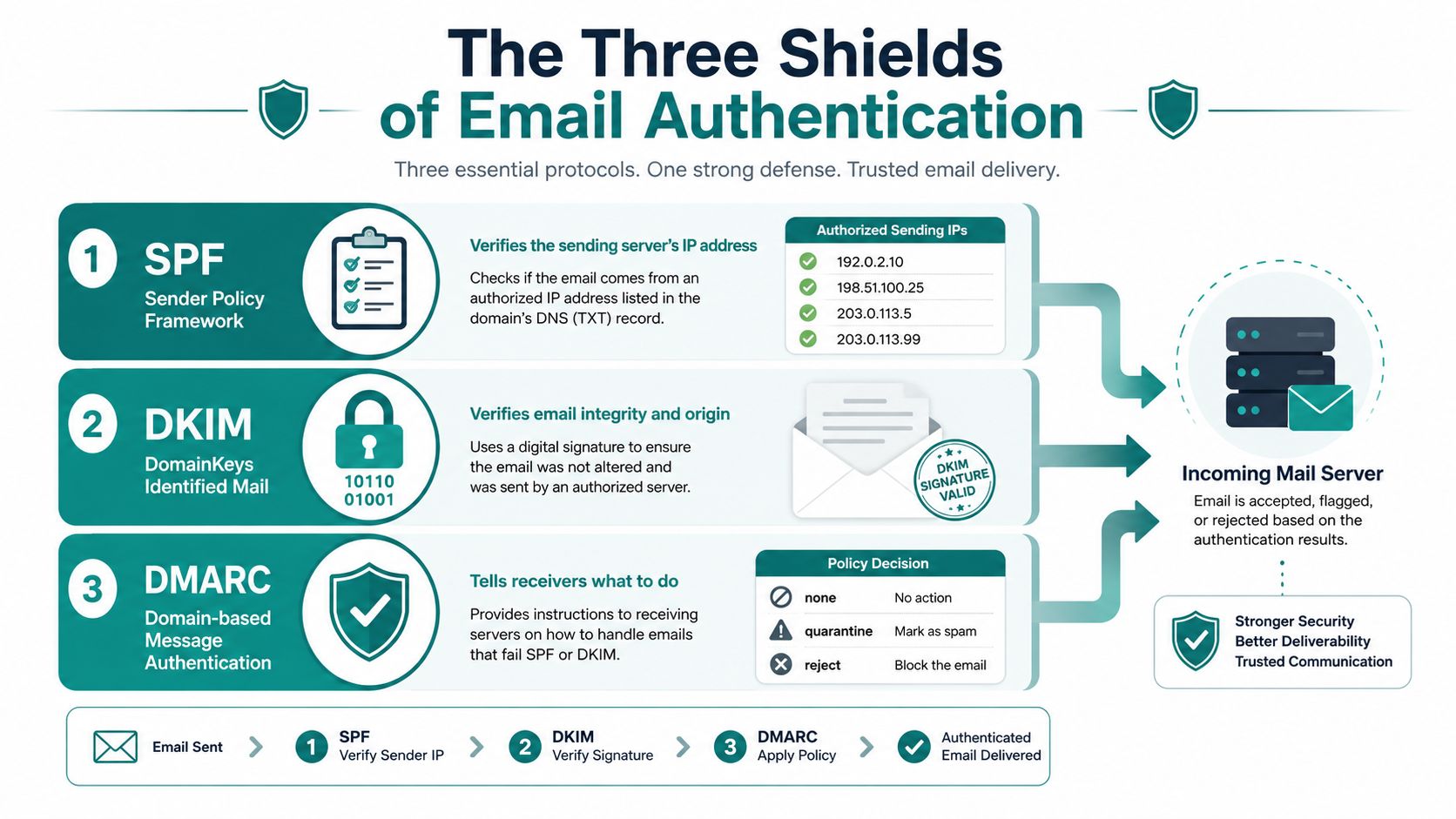
A domain that has not been authenticated is like a shop with no sign on the door. People may still arrive, but mailbox providers have no easy way to tell whether the sender is legitimate. Before you focus on subject lines or design, SPF, DKIM, and DMARC need to be in place so your sender identity can be trusted.
Mailbox providers are cautious for a reason. They check who is allowed to send from your domain, whether the message stayed intact after it left your platform, and what should happen if something looks inconsistent. Without those signals, even a well-written email can have trouble reaching the inbox.
What each layer does in plain English
SPF is the permission list. It tells receiving servers which services are allowed to send mail on your behalf.
DKIM is the signature. It helps prove the message was not altered after it left your sending platform.
DMARC is the policy layer. It tells mailbox providers what to do if SPF and DKIM do not line up, and it can begin in monitoring mode with p=none so you can watch what is happening before you enforce anything, as described in Mailgun's deliverability setup guide (Mailgun deliverability setup).
That order is easier for beginners because it starts with observation. You can see how mail behaves before you make the rules stricter.
Start with visibility, not punishment. Monitoring shows what is broken before you lock yourself out of your own mail.
A beginner-friendly rollout
A practical rollout is simple.
- Publish SPF only for services you use. If a platform never sends mail for you, it should not be in the list.
- Turn on DKIM in your email service provider. Most platforms support this without code.
- Add a DMARC record in monitoring mode. Review aggregate reports for a few weeks before you change the policy.
- Tighten policy only after legitimate mail is aligned. That gives you a safer path to enforcement.
One common mistake is cramming too many senders into one SPF record. Another is sending from multiple unaligned domains, which weakens the trust signal you are trying to build. Mailgun also notes that only 13% of senders use inbox placement tests to improve deliverability, which shows how many people skip validation altogether (Mailgun deliverability takeaways).
If you are comparing tools while you set things up, this overview of best email marketing platforms for small business can help you think through the bigger setup. A good platform makes authentication easier, but it does not replace it.
You do not need a dev team for this. You need a calm checklist and a little patience.
If you want a simple second opinion while checking your setup, the SPF and DKIM checker from MailGenius is a practical resource for spotting common problems before you send.
Warming Up a New Domain and Finding Your Cadence
A new domain doesn't have a reputation yet. That's the whole problem. If you send a large batch right away, mailbox providers don't know whether you're a careful sender or someone testing the waters with a bloated list.
Warm-up is really just reputation building. You're teaching mailbox providers that your mail is wanted, that your list responds, and that you can send consistently without creating complaints.
Start small and stay steady
A practical warm-up pattern is to begin with roughly 100 to 500 emails per day for the first few days, then increase volume by about 15% to 20% per week as engagement stays healthy, based on common deliverability guidance from Mailmunch (Mailmunch deliverability guide). The point isn't speed. It's trust.
Start with the people who are most likely to engage. That usually means your newest subscribers, your most active readers, or the contacts who already clicked recently. If those people open and reply, your sender reputation has a better chance to mature smoothly.
Avoid the two habits that cause the most trouble
The first mistake is scaling faster than your reputation can support. When that happens, mailbox providers may slow your mail down or place it in spam. The second mistake is mixing very different kinds of mail on the same domain, especially if one stream is colder or less engaged than the other.
- Keep newsletter mail and cold outreach separate when possible. Different audience behavior creates different reputation signals.
- Increase volume only when engagement remains healthy. A spike in complaints or bounces is a warning, not background noise.
- Check results after each increase. If anything looks off, pause before the next step.
Consistency teaches trust faster than volume does.
For many beginners, the process feels less daunting. You don't need to “hack” the system. You need a gentle rhythm, a clean list, and enough discipline to let trust build.
The Steady Problem of List Decay
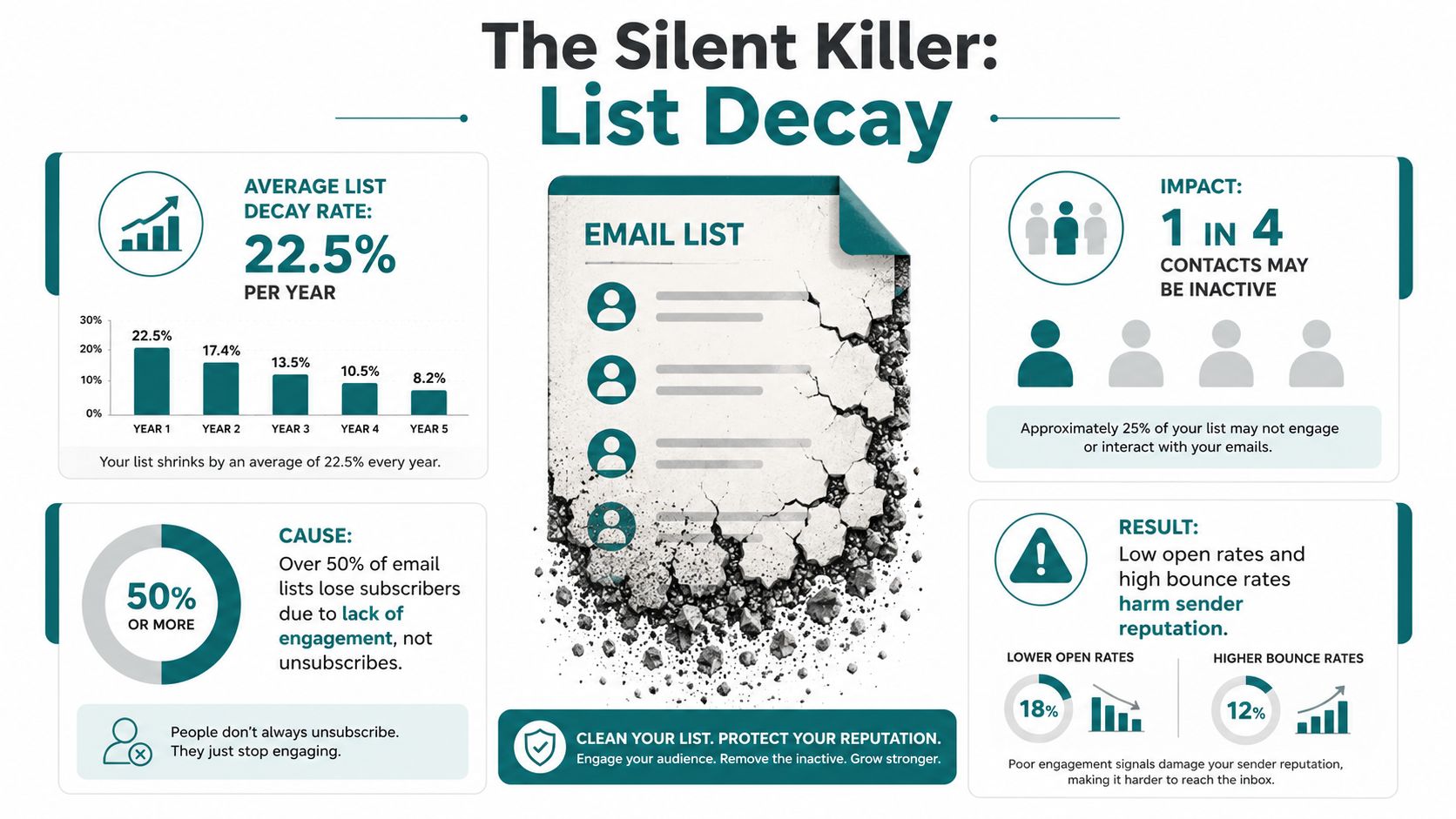
Most deliverability problems do not begin with bad writing. They begin with old contacts. People change jobs, abandon inboxes, stop reading, or drift away. Over time, that leaves a list full of addresses that no longer support your sender reputation.
That is why list hygiene deserves more respect than it usually gets. It is not admin work. It is asset care, the kind that keeps a useful list from turning into dead weight.
 email list inactivity and decay rates." />
Why older lists get heavier over time
A widely used deliverability framing notes that lists naturally decay by 20% to 30% per year, according to Maropost's email deliverability overview (Maropost deliverability guide). That means a list can look fine on paper while becoming less responsive. Like a pantry with food that is still there but no longer fresh, the inventory remains while its value fades.
Sender's 2026 guide adds practical thresholds that help beginners judge the Health of their list: hard bounces should be removed immediately, bounce rates should stay under 2%, and spam complaint rates should stay under 0.1%, with 0.3% described as a danger zone where Gmail filters aggressively. Those numbers give you a clear boundary, and they make the risk easier to see (Sender email deliverability guide). If your list keeps feeding mailbox providers bad signals, inbox placement gets harder to hold.
Treat pruning as protection, not loss
The instinct is often to keep every contact forever. That feels productive, but it usually is not. A smaller, healthier list can outperform a bloated one because it sends stronger engagement signals and fewer warning signs. It is the same logic as caring for a garden. Cutting away the weak growth helps the healthy parts get more of what they need.
Practical rule: if someone has not shown interest for a long time, they are not a trapped asset, they are a drag on the asset.
If you want a practical walk-through for trimming a list safely, this how to clean an email list guide is a useful next step. It pairs well with the idea of treating your list like something you maintain, not something you hoard.
The emotional shift matters here. You are not losing people. You are preserving deliverability for the people who still want to hear from you.
Re-Engagement, Segmentation, and Preference Centers
A healthy list doesn't need constant pressure. It needs better sorting. When you separate active readers from quiet ones, you make it easier to send the right message to the right person, and mailbox providers notice that pattern.
That's why a good re-engagement system is calmer than people expect. You're not pleading with anyone. You're giving them a choice.
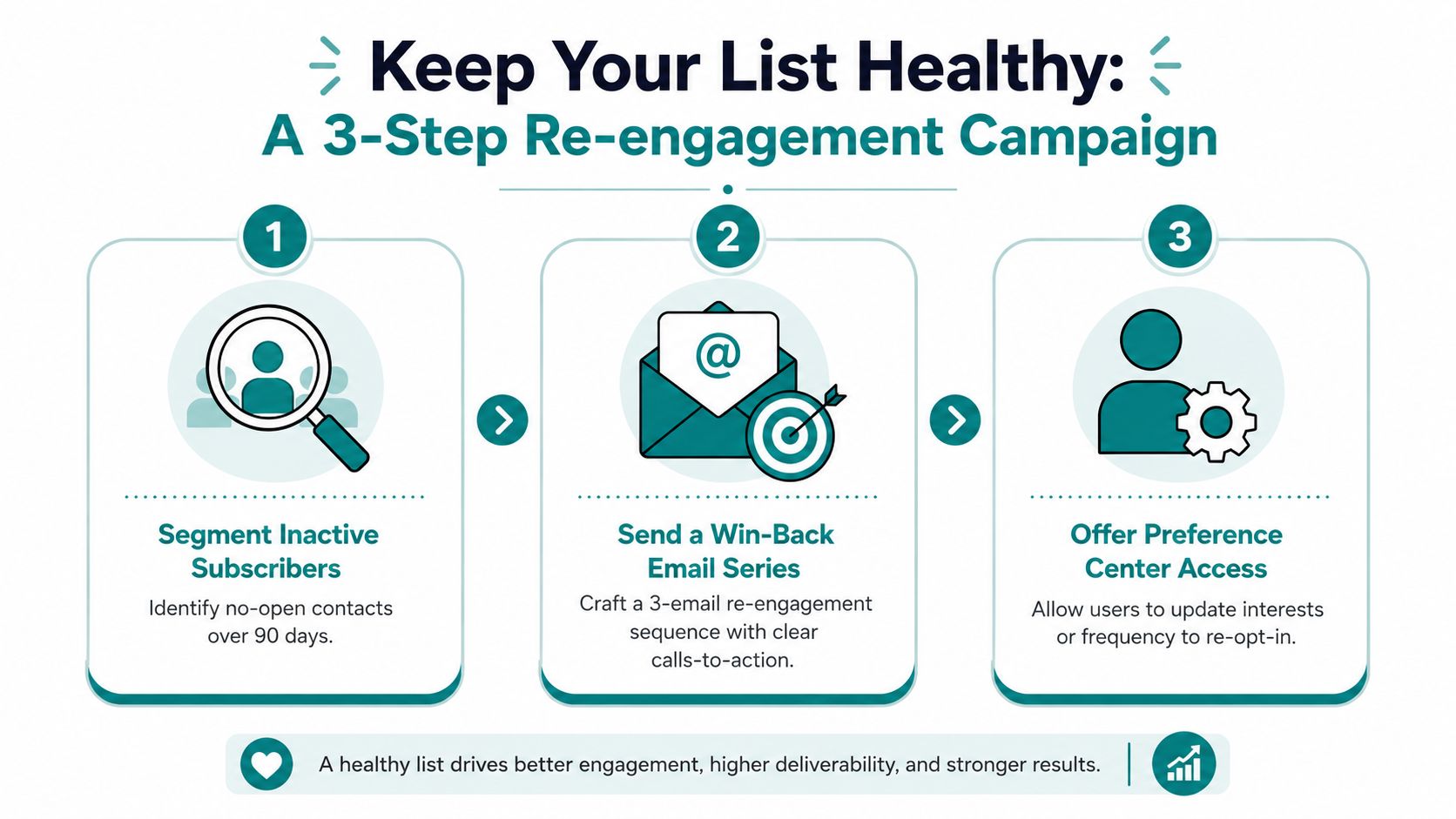 email list Health." />
A simple win-back path
Sender's guidance suggests sunset decisions after 90 to 180 days without engagement, and that lines up with a practical re-engagement approach (Sender email deliverability guide). A calm sequence works better than a hard sell.
- Identify inactive subscribers. Start with contacts who haven't opened in the last 90 days or more.
- Send a short win-back series. Keep the tone respectful and simple.
- Offer a preference center. Let people choose topics or frequency instead of forcing a yes-or-no outcome.
The reason this works is simple. People who care will respond. People who don't care can step away. That helps your engagement metrics and lowers complaint risk.
Why segmentation protects inbox placement
Segmentation means not every subscriber gets the same message. The most engaged readers can get the fullest version of your newsletter, while quieter contacts can receive lighter, more targeted check-ins. That reduces fatigue.
A preference center gives people control over what they receive. If someone wants fewer messages, a narrower topic, or a slower pace, that choice is often better than an unsubscribe. Mailbox providers reward that kind of respect because it usually leads to fewer complaints and better engagement over time.
If unsubscribe handling is part of your cleanup process, this unsubscribe management guide can help you think through the quieter side of list care too.
The goal is not to force everyone to stay. The goal is to keep the right people close.
Subject Lines and Content That Respect the Reader
Deliverability improves when the reader feels respected. That starts with the subject line, but it doesn't end there. The message body, the footer, and the way you structure links all shape how mailbox providers and subscribers respond.
You do not need clever tricks. You need clarity.
Write like a person, not a lure
A good subject line tells the truth about what's inside. The preview text should support that promise, not bait the click with something unrelated. When the email opens, the body should deliver the same idea without making the reader dig for it.
Avoid clutter that looks manipulative. Overstuffed graphics, awkward link blocks, and misleading phrasing tend to erode trust. A plain, readable message often performs better because it feels honest.
Clear writing is not boring. It's easier to trust.
Keep the structure clean
Your email should be easy to scan. That means enough plain text to carry the message, a balanced HTML design, and a footer that includes a real physical address and a working unsubscribe link. Those aren't just legal niceties, they're trust signals.
If you want a quick weekly lens on performance, keep these three markers in mind. Complaint rate below 0.1%, bounce rate below 2%, and a steady look at open and reply trends after each send. Mailgun, Sender, and Attentive all point to low complaint levels as a core Health signal, with Attentive also emphasizing complaint rates below 0.10% as a strong benchmark (Attentive deliverability guide). If one of those numbers drifts, pause the next send, segment more tightly, or run a re-engagement sweep.
A simple content checklist
- Use clear subject lines. Tell the reader what the email is about.
- Match the body to the promise. Don't bait and switch.
- Keep links purposeful. A few relevant links are better than a crowded wall of them.
- Make unsubscribing easy. A clean exit protects the rest of the list.
Deliverability does not demand constant dashboard watching. It asks for a calm weekly habit and enough discipline to send only what people want.
Your First Week of Deliverability Habits
The easiest way to get started is to turn the work into a small routine. You don't need to fix everything at once. You need one week of intentional habits that make your list safer and your future sends easier.
A beginner can feel real progress. The tasks are simple, but they matter.
Your first-week deliverability checklist
| Action | Why It Matters | Time Needed |
|---|---|---|
| Authenticate your sending domain | Helps mailbox providers verify who you are | Short setup session |
| Review SPF for unused services | Keeps authentication signals clean and accurate | 15 to 30 minutes |
| Remove hard bounces immediately | Protects list quality and sender reputation | Quick cleanup |
| Draft a short re-engagement email | Gives inactive readers a chance to opt back in | One writing session |
| Check complaint and bounce trends | Lets you catch trouble before it spreads | A few minutes after send |
| Confirm your unsubscribe link works | Lowers frustration and complaint risk | A quick test |
If you want a walk-through while you check your setup, the guide on SPF and DKIM setup from CleanMyList is a helpful companion resource.
One calm habit beats ten rushed fixes
Start with authentication, then clean up the obvious list problems. After that, send a re-engagement email to people who haven't responded in months, and do not send your next campaign to everyone at once. That pattern gives you control without adding stress.
If you've been waiting for a sign that it's not too late to get this right, this is it. You can build a list that behaves like a real asset, not a pile of forgotten addresses.
Victoria OHare offers beginner-friendly guidance for people who want to build something steadier online, especially if you're looking at List Building, Affiliate Marketing, and simple systems that don't require tech overwhelm. If you want more support around creating an owned audience and using email as a long-term asset, visit Victoria OHare and explore the step-by-step resources there.