
If you're over 50 and wondering whether you're too late to learn this kind of tech, you're not alone. A lot of women feel behind, especially when money feels tighter than it used to and Retirement doesn't look as secure as they once hoped. Add online tools, dashboards, and confusing tutorials, and it's easy to think, "Maybe this just isn't for me."
I don't believe that for a second.
You don't need to become a coder. You don't need to build some giant, complicated system. If you can follow a few simple steps and click a few buttons, you can learn how to automate repetitive tasks in a way that feels calm, safe, and useful.
The Hidden Cost of Doing Everything Yourself
I remember a season when my to-do list looked full from morning to night, yet I still ended the day with that sinking feeling that I hadn't really moved anything forward. I had answered emails, copied links, updated a spreadsheet, followed up with someone, posted content, and checked three different platforms. I was busy all day. I just wasn't making real progress.
That kind of busy work is sneaky. It doesn't look dramatic. It shows up in tiny tasks that seem harmless on their own.

What repetitive work looks like in real life
For a solo creator, repetitive work often sounds like this:
- Answering the same question again: Sending nearly identical replies about pricing, links, availability, or next steps.
- Moving information by hand: Copying a name from a form into a spreadsheet, then into your email platform, then into your notes.
- Chasing small admin jobs: Creating invoices, checking whether they've been paid, then sending reminders one by one.
- Posting manually everywhere: Publishing a blog post, then opening each social platform and writing a separate update from scratch.
None of these tasks are wrong. They just pull your attention away from the work that grows your business, like writing, serving clients well, building your email list, or creating offers that support your next chapter.
A benchmark insight from McKinsey says employees spend nearly 60% of their time on tasks that could be partially or fully automated, which points to a huge chance to reclaim time for more meaningful work, as summarized in this strategic framework for automating repetitive business tasks.
You don't always need more discipline. Sometimes you need fewer manual steps.
Why this matters more in midlife
When you're building income in this stage of life, time feels different. You may be caring for family, managing a household, working a job, or rebuilding after a life transition. So when people say, "Just spend a few extra hours on it," that advice can feel almost insulting.
You need simplicity. You need peace of mind. You need systems that support you instead of draining you.
That's why learning how to automate repetitive tasks matters. Not because automation is trendy, but because doing everything yourself creates a hidden cost. It eats attention, confidence, and energy. And if you're already feeling stretched, that cost is too high.
Why Automation Is Simpler Than You Think
A lot of people hear the word "automation" and picture coding screens, confusing logic maps, and expensive business software. That's not what most beginners need.
Think of automation like setting a coffee maker the night before. You do a small setup once, and the coffee is ready in the morning without you standing there half awake pressing buttons. Business automation works the same way. You tell a tool, "When this happens, do that."
You don't need to be technical
That might mean:
- When someone fills out my form, send them a welcome email.
- When I publish a blog post, add a reminder to share it later.
- When an invoice is overdue, send a polite follow-up message.
- When I save a file in one folder, move a copy into an archive folder.
It's less "build a machine" and more "create a simple rule."
Automation is already part of normal work now. One industry roundup reports that 65% of workers use some form of automation daily, which shows it isn't just for IT teams anymore. You can see that shift in this overview of automation in repetitive tasks.
If you've been assuming this is only for younger people, developers, or big companies, that assumption deserves a gentle challenge.
Start with visual, low-stakes tools
I understand the fear of breaking something. That's real. The internet is full of tutorials that jump straight into jargon and make simple things sound intimidating.
You don't need that.
You need tools that show clear steps, use plain labels, and offer templates you can test without risking your whole business. If you'd like an example of that approach, this guide to automation without coding is a helpful place to see what beginner-friendly setup can look like.
Practical rule: If a tool makes you feel more confused after ten minutes, it's not the right starting point.
The goal isn't to become "good at tech." The goal is to remove tiny tasks that wear you out. That's why simple automation often feels less like learning software and more like buying back a little breathing room.
How to Find Your First Tasks to Automate
The easiest way to get overwhelmed is to try automating everything at once. Don't do that. Your first win should be small, obvious, and easy to test.
For the next day or two, just notice what you repeat. You don't need a fancy spreadsheet or a complicated planning session. A sticky note works fine.
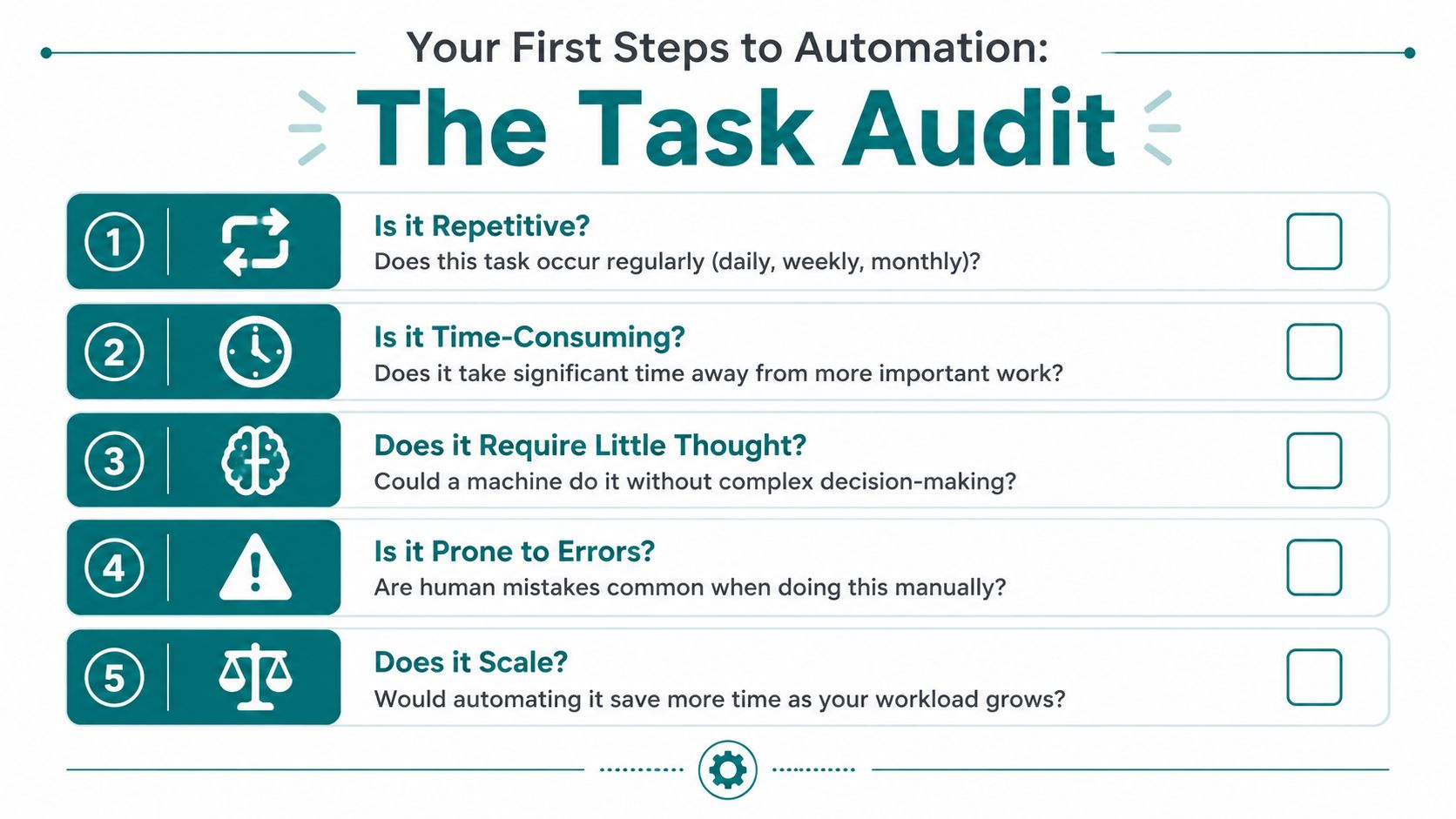
Your simple task audit
Ask yourself these questions when a task pops up:
- Do I do this often: Daily, weekly, or every time a customer or subscriber takes a certain action?
- Does it interrupt my focus: Even if it only takes a few minutes, does it pull me out of deeper work?
- Is it mostly copying or moving information: These are often strong automation candidates.
- Does it follow the same pattern every time: If the steps rarely change, that's a good sign.
- Would a mistake be annoying: Repetitive tasks are often where small errors creep in.
You are not looking for the most exciting task. You're looking for the most predictable one.
Common beginner-friendly automation candidates
Here are the tasks many creators notice first:
- Repeated emails: A welcome email, a thank-you email, or a frequently used client reply.
- Data entry: Moving form details into a spreadsheet or contact list.
- Content reminders: Creating a task when a new post goes live so you remember to repurpose it.
- File organization: Saving files into the right folder structure.
- Invoice follow-ups: Sending a reminder instead of remembering it manually.
One practical framework recommends scoring tasks by value and effort, with Quick Wins defined as high-value, low-effort automations you should do first. That guidance comes from this practical automation framework.
A softer way to score value and effort
You don't need a formal workshop. Just ask two questions:
| Question | What to look for |
|---|---|
| Is this high value | It saves time, reduces mistakes, or removes mental clutter |
| Is this low effort | It has clear steps, uses only one or two apps, and doesn't require complex decisions |
If the answer is yes to both, you've probably found your first automation.
Start with the task that makes you say, "I am so tired of doing this by hand."
That first success matters. It gives you proof that you can learn this without turning your business into a science project.
Five Simple Automation Recipes You Can Use Today
You don't need abstract theory here. You need examples that feel familiar.
The recipes below are meant to be simple, visual, and low-stakes. Even if you only try one, you'll start to understand how to automate repetitive tasks in a way that supports your business.
Common automation targets for businesses include data entry (38%), document management (32%), and lead nurturing (30%), according to this automation statistics roundup from ServiceNow. For creators, those often show up as email list tasks, file handling, and routine follow-up.
Recipe one, welcome new subscribers automatically
Before automation, this usually looks like checking for new signups and sending a manual message when you remember.
After automation, the email goes out on its own.
- Step 1: Choose your email platform, such as Mailchimp, ConvertKit, or another beginner-friendly tool.
- Step 2: Write one warm welcome email. Keep it short. Thank them for joining, tell them what to expect, and share one useful link.
- Step 3: Turn on an automation that sends that email when someone subscribes.
- Step 4: Test it using your own email address first.
This is one of the kindest automations you can build because it helps you stay consistent even on days when life gets busy.
Recipe two, turn each new blog post into a follow-up task
A lot of good content gets published once and forgotten. Not because it wasn't useful, but because you were tired.
Try this:
- Publish your blog post.
- Use an automation tool to create a to-do item in Trello, Asana, or your notes app.
- Title it something simple, like "Repurpose Tuesday blog post."
- Add a checklist inside the task for email, Facebook post, Pinterest pin, or newsletter mention.
Now you don't have to rely on memory. The reminder appears automatically.
If repetitive typing is one of the things wearing you down, a tool outside full workflow automation can help too. A practical guide like this 2026 Mac text expander handbook shows how to save common phrases, replies, and links so you stop retyping the same wording all day.
Recipe three, batch your social content
Manual posting steals attention in small but constant ways. Batching gives you that attention back.
A simple social scheduling routine looks like this:
- Write several captions at once: Stay in one creative mode instead of switching all week.
- Upload them into a scheduler: Tools like Buffer or Hootsuite let you set times in advance.
- Attach the right image or link: Do it while the post is fresh in your mind.
- Let the posts publish automatically: Then step away.
This isn't about being everywhere. It's about reducing the daily "I need to post something" pressure.
A short walkthrough can help if you'd rather see it than read about it:
Recipe four, send invoice reminders without awkwardness
This one can feel emotional because money conversations often do.
Instead of manually checking and wondering what to say, set a polite sequence:
- When an invoice reaches its due date, your system checks whether payment has arrived.
- If it hasn't, it sends a gentle reminder.
- If payment comes in, the reminder stops.
That removes two common pains at once. You don't have to remember, and you don't have to rewrite the message each time.
Recipe five, send form entries where they belong
This is one of the clearest beginner automations because the result is easy to see.
A simple version looks like this:
| Manual version | Automated version |
|---|---|
| Someone fills out your contact form | The form submission becomes the trigger |
| You copy their details into a sheet | Their information appears in the sheet automatically |
| You add them to your email tool later | The contact is sent to the right place right away |
If you've ever copied names, email addresses, or message details from one tab to another, you already know why this feels so satisfying.
The best first automation isn't the fanciest one. It's the one that removes a task you already dislike.
Choosing Your Beginner-Friendly Automation Tools
You do not need a giant stack of software. In the beginning, too many options can be as stressful as too few.
A better approach is to pick one tool that feels manageable and learn just enough to create one useful automation.
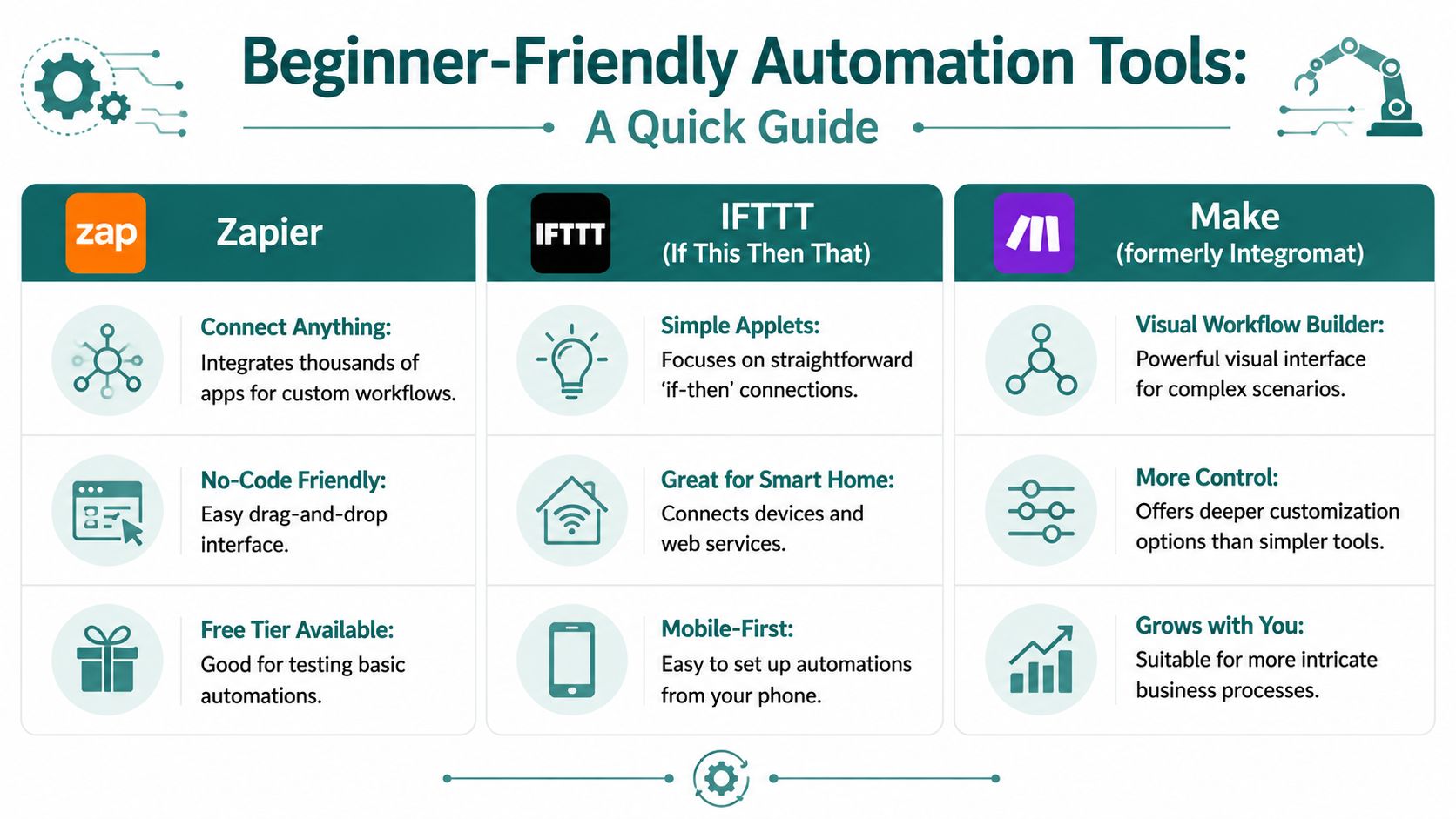
A simple side-by-side view
Here are two tools many beginners consider first:
| Feature | Zapier | Make (formerly Integromat) |
|---|---|---|
| Best fit | Beginners who want templates and a straightforward setup | Visual learners who want to see the workflow mapped out |
| Learning feel | Usually simpler at the start | More visual, but can feel more detailed |
| Templates | Strong library of ready-made workflows | Also offers templates, with more visual customization |
| When to choose it | You want to get your first automation running quickly | You like seeing the full path from trigger to action |
How to choose without spiraling
If you're hesitating between tools, use this filter:
- Choose Zapier if you want a calmer first experience and lots of pre-built ideas.
- Choose Make if you like diagrams and want to understand how data moves step by step.
- Skip switching constantly because restarting in a new tool every week is its own form of overwhelm.
You may also run into platforms that combine automation with marketing and customer management. If that interests you later, this overview of HighLevel for beginners can help you understand where an all-in-one option might fit.
One more layer of support
Some beginners feel fine setting up automations but freeze regarding customer replies and help content. In that case, something like SupportGPT-1 can be useful for organizing support communication so you're not writing from scratch every time.
That doesn't replace your voice. It just reduces the blank-page feeling.
I understand being cautious here. There are plenty of tools online, and not all of them deserve your trust. That's why it's wise to start with one simple use case, one test, and one clear purpose.
How to Keep Your Automations Simple and Safe
The fear underneath all of this is usually not "Can I click the buttons?" It's "What if I mess something up?"
That's a fair question. The good news is that beginner automations don't need to be risky. You can build them in a way that feels contained and reversible.
Use a small safety checklist
Before turning anything on, run through this:
- Test with your own information: Use your own email address, your own sample form, or a practice task.
- Watch one full run: Make sure the trigger happens and the action goes where you expected.
- Check the wording: Read any automatic email or message before you trust it.
- Start with one workflow only: Don't build five at once.
- Know how to turn it off: Most tools let you pause an automation quickly if something looks off.
Run your automation once manually and see if it does what you expect.
That single habit prevents a lot of stress.
Keep your rules boring
The safest automations are often the least glamorous. They have clear triggers, clear actions, and very few exceptions.
Good beginner examples include:
- A welcome email after signup
- A reminder task after publishing content
- A spreadsheet update after form submission
- An invoice reminder after a due date
These are steady, visible, and easy to check. If you want extra guidance around email workflows in particular, these email automation best practices can help you keep things organized and reader-friendly.
Progress matters more than perfection
You don't need to master all of this in a weekend. You only need one working system that saves you time and lowers mental clutter.
I still remember how intimidating dashboards felt at first. The first time I set up a simple workflow, I checked it three times because I was sure I had missed something. But when it worked, the feeling wasn't pride in the tech. It was relief.
That's what you're building toward. More calm. More consistency. More room to focus on work that supports your income and your peace of mind.
And no, you're not behind.
You're learning a skill that can help you protect your energy, support your business, and make this next chapter feel more stable. The next five years will pass either way. The only question is whether you'll use them to build something that gives you peace of mind.
If you'd like gentle, step-by-step help building an online income stream without the usual tech overwhelm, take a look at Victoria OHare. Her content is designed for beginners, especially midlife women who want simple guidance, owned assets like an email list, and a calmer path toward financial independence.