
If you're trying to build something online and you end most days thinking, “I was busy the whole time, so why does it feel like nothing really moved forward?” you're not alone. A lot of women in midlife feel behind, especially when Retirement doesn't feel as secure as they hoped and the online world seems to change every five minutes. That feeling isn't a sign that you've missed your chance. It's often a sign that you're carrying too many small tasks by hand.
Automation without coding can help with that.
Not because you need to become a tech person overnight. Not because you need a complicated system. But because a few simple workflows can give you more calm, more control, and more room to focus on the work that grows your business.
That Feeling of Being Busy but Not Productive
You answer a message on Instagram. Then you copy an email address into your list. Then you update a spreadsheet. Then you send a welcome email manually because you don't want a new subscriber to feel ignored. Then you remember you still haven't shared your latest blog post anywhere.
By lunchtime, you've done a lot. But you still feel behind.

For many creators, this is the core problem. It isn't laziness. It isn't lack of discipline. It's that the day gets eaten up by tiny repeated jobs that don't require your creativity, but still drain your energy.
I remember a season when I felt like I was “working on my business” all day, yet I had very little to show for it. I was clicking between tabs, renaming files, replying to the same kinds of questions, and trying to remember who got which freebie. I almost blamed myself for not being more organized.
The work that looks productive
A lot of manual work can feel responsible because it is necessary. Things like:
- Copying customer details from one tool into another
- Sending repeat emails with the same links and instructions
- Posting content manually every time a new article goes live
- Tracking leads in a spreadsheet because that feels safer than setting up a system
The trouble is that these jobs create motion, not always progress.
You can be fully occupied and still not be building something that feels stable.
When you're doing everything yourself, your business depends on your memory, your energy, and your ability to keep up. That's exhausting. It also makes every day feel heavier than it needs to be.
Why this matters more in midlife
If you're building an online business in your 50s or beyond, peace of mind matters. You probably don't want more chaos. You want income that feels steady, work that fits your life, and systems that don't demand constant babysitting.
That's why automation without coding matters. Properly executed, it isn't about becoming more robotic. It's about removing the chores that keep stealing your attention.
The Hidden Cost of Doing Everything Manually
Doing things manually makes sense at the beginning. It's a common initial approach. You test an idea, send a few emails yourself, keep notes in Google Sheets, and piece things together as you go.
But there comes a point when “I'll just do it myself” becomes expensive.
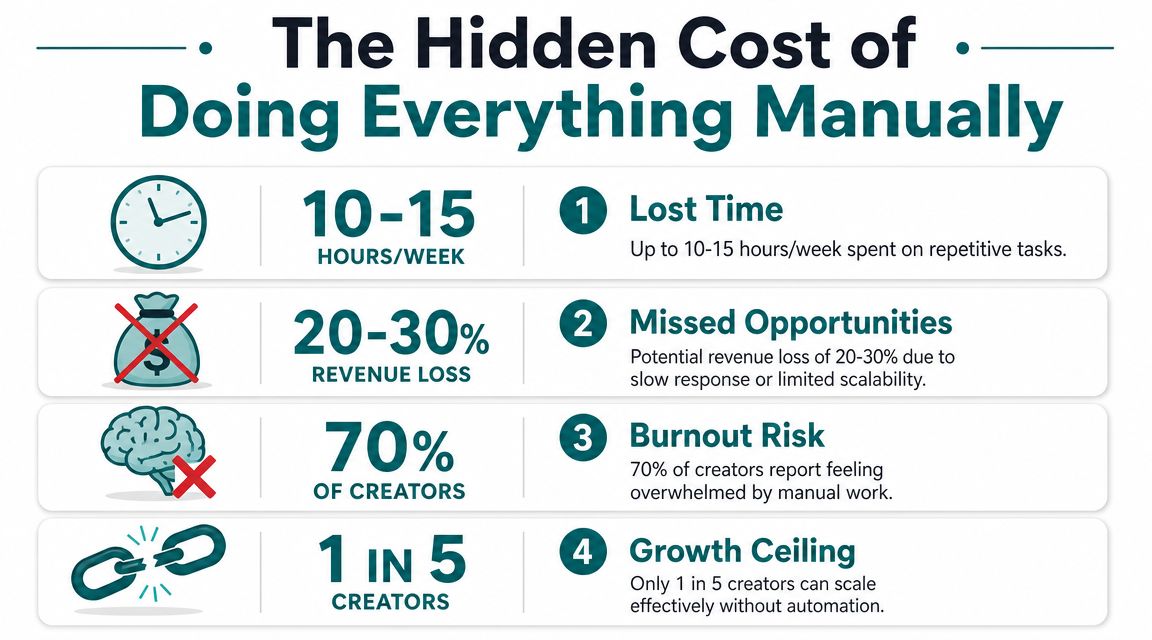
Not always in money first. Often in missed follow-up, delayed replies, inconsistent publishing, and the mental load of trying to remember everything. Every hour spent on repetitive admin is an hour you can't spend writing, building trust with readers, improving your offer, or learning a skill that increases your independence.
Automation is not a fringe idea anymore
This is one reason automation has moved into the mainstream. Forrester estimated the low-code and digital process automation market at $13.2 billion in 2023, with projections of roughly $30 billion by 2028, and almost 60% of businesses have already implemented automation solutions according to this industry roundup on no-code automation statistics.
That matters because it changes the frame. Automation without coding isn't some niche hobby for people who love dashboards. It's now part of how modern businesses run routine work.
What manual work quietly steals
The true cost usually shows up in ordinary moments:
- A new subscriber waits too long because you meant to send the welcome message later.
- A potential customer slips away because their question got buried in your inbox.
- A blog post underperforms because promoting it manually took more effort than writing it.
- You feel constant low-grade stress because your system lives in your head.
If you'd like a practical example of how content tasks can be turned into repeatable systems, Taja AI's automation playbook walks through the kind of workflow thinking that helps creators stop reinventing the wheel every week.
Practical rule: If a task happens often, follows the same pattern, and doesn't require deep judgment each time, it's a good candidate for automation without coding.
The goal isn't more tools
This part is important. Automation isn't about collecting apps. It isn't about making your business look advanced from the outside.
It's about reducing friction inside your day so you can create with a clearer mind. That's the hidden value. Not more hustle. More breathing room.
What Is Automation Without Coding Really
At its simplest, automation without coding means setting up software to handle repeat tasks for you through a visual interface instead of writing code.
Imagine setting up a row of dominoes. You arrange them once. Then when one thing happens, the next thing happens automatically.
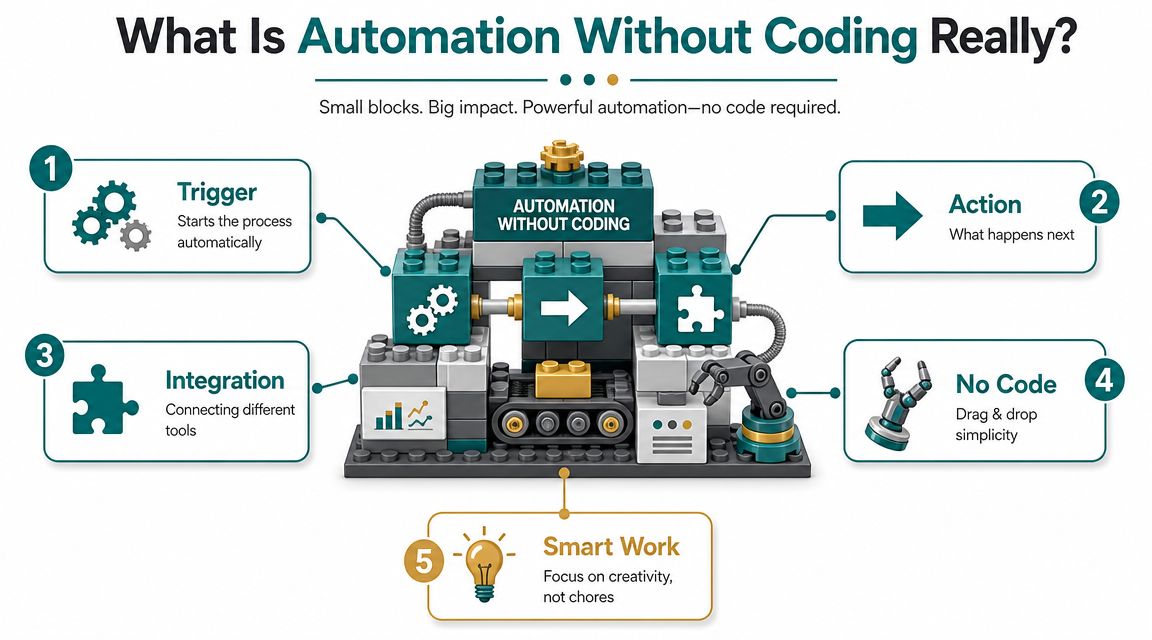
Most automations are built on two ideas:
- Trigger means the event that starts the workflow
- Action means the thing the system does next
A simple example
Someone fills out your contact form.
That is the trigger.
Then your system adds them to your email list, tags them based on interest, and sends a welcome email.
Those are the actions.
Not magic. Just clear logic.
Why people are drawn to it
These tools are growing because they make useful systems easier to build. One industry summary says teams using no-code platforms complete projects 2.7 times faster than teams using traditional development methods, with some organizations seeing 60 to 70% reductions in development time and average annual savings of $187,000 per organization, according to this no-code automation adoption summary.
For a solo creator, the important part isn't the enterprise savings. It's the idea behind them. Visual tools let non-technical people create workflows that used to require developer time.
Here is a simple video if you learn better by seeing the concept in action.
What tools are actually doing
A no-code tool usually helps you connect apps and define the rules between them. That might mean:
| Part | Plain English meaning |
|---|---|
| Form | Someone gives you information |
| Connection | Your tools pass that information along |
| Rule | If this happens, do that |
| Output | Email sent, tag added, row created, task assigned |
If you're in content marketing, this guide for marketing teams gives a grounded explanation of how content automation works in everyday terms.
And if your first goal is email follow-up, it helps to understand the tools on the list side too. This overview of email marketing platforms for small business can help you see where automation often starts for beginners.
Automation without coding works best when you can clearly answer one question. “When this happens, what should happen next?”
Once you can answer that, you're already thinking like someone who can build a workflow.
You Can Learn This Even if You Feel Tech-Challenged
A lot of people assume this kind of thing is only for younger creators, people who grew up online, or anyone who “just gets tech.”
I don't believe that.
I remember the first time I opened an automation tool and looked at all the boxes and arrows. I almost closed the tab. It felt like one more digital thing I was supposed to understand immediately. If you've ever had that reaction, you're normal. It doesn't mean you can't learn it.
The fear usually isn't the tool
Most of the time, the fear is really one of these:
- “What if I break something?” You don't want to mess up your emails or lose a lead.
- “What if I can't follow the logic?” The steps look obvious to everyone else, but blurry to you.
- “What if I'm too late to learn this?” That quiet worry shows up for many women in midlife.
None of those concerns are silly. They deserve a calm answer.
The calm answer is this. You don't need to learn everything. You only need to learn the next useful pattern.
No-code doesn't mean no attention
It's important to be honest. Some people talk about no-code tools as if you can click a few buttons once and never think again. Real life is messier.
A key challenge is the difference between no-code and no-maintenance. As explained in this breakdown of no-code automation tools, success depends on understanding your process and handling exceptions. The most common failure isn't building the first workflow. It's keeping it reliable when inputs change.
That might sound discouraging, but I think it's reassuring.
Why? Because if something stops working, it doesn't mean you failed or that you're bad at tech. It usually means a form field changed, a tool connection expired, or the workflow needs a small adjustment. That's normal maintenance, not personal failure.
Some caution is healthy. There are overhyped tools online, and there are systems people promise are “set and forget” when they really aren't. Education matters more than hype.
A gentle way to build confidence
Start small enough that you can understand what each step is doing. One form. One tag. One email. Test it. Watch it run. Fix one tiny issue. Repeat.
If you'd like to explore a platform that combines marketing tools and automation in one place, this GoHighLevel trial overview shows what that kind of all-in-one setup can look like for beginners.
You are not too old. You are not too late. You're learning a practical skill, one piece at a time.
Four Simple Automations You Can Build This Week
Say you sit down on Monday with good intentions. You want to write, reply to people, share your latest post, and welcome new subscribers. By Friday, half your energy has gone into small repeat tasks that all felt urgent in the moment.
That is the perfect place to start with automation.
You do not need a giant system. You need a few small helpers that take the same jobs off your plate each time they come up. A good first automation is a bit like putting your keys in the same bowl by the door. It does not change your whole life. It removes one source of friction.
A practical starting point is to build 2 or 3 workflows that happen often, follow clear steps, and save you time right away. As noted in this practical no-code automation rollout guide, it helps to write down the goal, the tools involved, the trigger, and the action before you build.
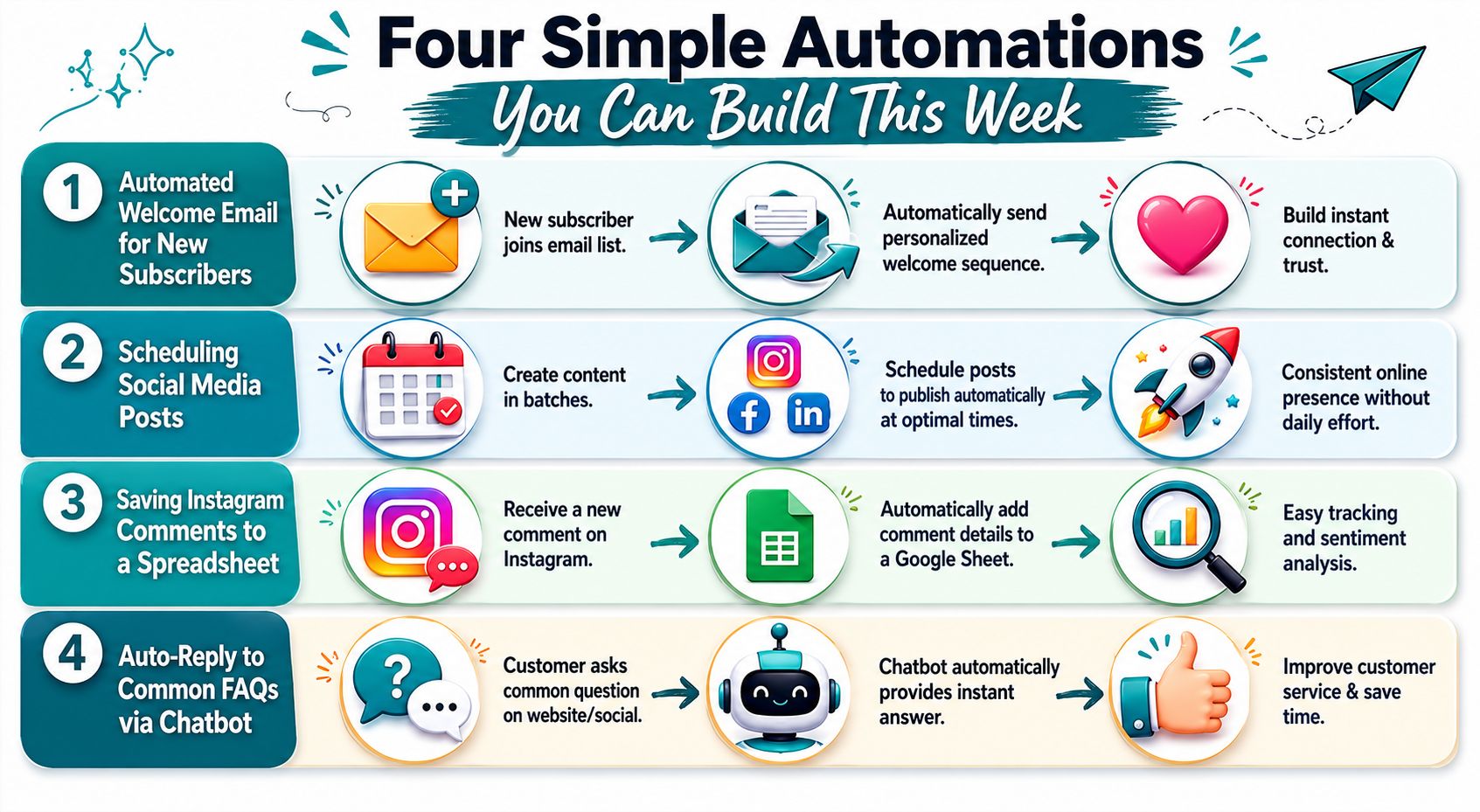
If that sounds technical, keep it simple. A notebook page is enough.
- Goal Help new subscribers get the right welcome email
- Apps Form tool and email platform
- Trigger New form submission
- Action Add tag and send email
- Data mapping Email field goes to email field, first name goes to first name
Automation one, lead capture and welcome sequence
This is often the easiest win for creators in midlife who are building an email list and do not want every new signup to create another task to remember.
Someone asks for your free guide. Your system sends it right away, tags them by interest, and starts a short welcome sequence while your work is still fresh in their mind.
Goal
Deliver the freebie quickly and begin the relationship with clarity.
Basic logic
- Trigger A person fills out your opt-in form
- Action Their details are added to your email platform
- Action A tag is applied based on the topic or freebie
- Action A welcome email is sent automatically
- Action A short follow-up sequence begins over the next few days
Why it helps
This one reduces mental load fast. You stop wondering who signed up, what they asked for, and whether you remembered to follow up. The subscriber also gets a better first experience, which builds trust early.
What to watch
Test it as if you were the subscriber. Check the links. Make sure the right freebie goes to the right person. If your form asks for a field that your email tool handles differently, fix that before you send traffic to it.
If you want a calmer starting point, this guide to email automation best practices can help you keep the sequence clear and manageable.
Automation two, social sharing for new content
Publishing content is only half the job. The other half is remembering to share it after you hit publish.
That second part drains a surprising amount of energy.
A simple automation can take your new blog post, video, podcast episode, or newsletter and send it into a social scheduler, create draft captions, or place a reminder in your task manager.
Here is a basic version:
| Step | What happens |
|---|---|
| Trigger | A new blog post is published |
| Action | A social media scheduler creates draft posts or publishes to selected channels |
| Action | A note or task is sent to you if review is needed |
Why this one works
Promotion is one of the first things to slip when life gets busy. An automated prompt or draft keeps your content visible without asking your brain to hold one more loose end.
Beginner tip
If full auto-posting feels like too much, do not force it. Start with draft creation only. That gives you consistency and still lets you add your own voice before anything goes public.
Automation three, affiliate link follow-up
This automation helps your follow-up feel more relevant without making your setup complicated.
Picture two subscribers joining your list from different places. One came from a page about email marketing. The other came from a page about webinars. They raised their hands for different reasons. Your system can note that and respond accordingly.
Goal
Keep your emails useful by matching early follow-up to the topic that brought the person in.
Simple setup
- Trigger A person joins your list from a specific form, landing page, or tracked link
- Action The system adds an interest tag
- Action The person receives a welcome path related to that topic
- Action Later emails can be grouped by what they clicked or requested
This can stay very small. One tag for Topic A and one for Topic B is enough to begin.
That matters because many newer creators assume they need a giant map with endless branches. You do not. You are just sorting people into a few clear folders so your follow-up makes sense.
Victoria OHare publishes beginner-focused guidance on Affiliate Marketing, List Building, and simple online systems, which can be useful if you want examples of how this kind of tagging supports clearer follow-up.
Automation four, new customer onboarding
The first sale feels exciting. Then comes the practical side. The buyer needs a receipt, access details, next steps, and a way to get help if something goes wrong.
If you handle each step by hand, sales can start to feel heavy. A short onboarding workflow changes that.
A clean onboarding flow
A simple setup might look like this:
- Trigger A customer completes a purchase
- Action A thank-you email is sent
- Action Access details or download links are delivered
- Action The buyer is tagged as a customer
- Action A follow-up email checks in and answers common first questions
Why this matters
Good onboarding lowers confusion right away. It also gives your customer the quiet reassurance that everything worked, which is a big part of building trust online.
What to include in the email
- Thank them clearly so the message feels warm and human
- Explain the next step in one sentence
- Link only what they need so the email does not feel crowded
- Tell them where to reply if they get stuck
Keep your first workflows simple
Start with automations that feel like relief.
A good filter is straightforward:
- Does this happen often? Repeated tasks are strong candidates.
- Are the steps usually the same? Predictable tasks are easier to automate.
- Does this still need your judgment? If yes, keep a review step.
- Will this give you more breathing room? If not, save it for later.
The goal is not to build a complicated machine. The goal is to make your week feel steadier, lighter, and easier to trust.
Building a Business That Gives You Peace of Mind
The deeper point of automation without coding isn't speed for its own sake. It's support.
You are building systems so your business doesn't depend on you remembering every tiny task. You are making room for the work that only you can do. Writing. Teaching. Encouraging. Creating trust. Making thoughtful decisions about your next chapter.
If you're cautious, that's okay. Caution can protect you from shiny tools and unnecessary complexity. Start with one workflow that removes one repeated burden from your week. Then let that small win teach you what you're capable of.
You don't need to become a programmer. You don't need to master every platform. You just need to build enough structure that your business starts giving something back to you. Time. Clarity. Breathing room. A little more confidence that you can do this after all.
The next few years will pass either way. The question is whether you'll use them to build systems that bring you more peace of mind.
If you'd like a calm, beginner-friendly place to keep learning about Affiliate Marketing, List Building, and simple online systems, you can visit Victoria OHare. It offers step-by-step guidance for women who want to build income online without drowning in tech.